Tell your AI assistant what you need. MerchCP puts your logo on tees, hoodies, caps, mugs, stickers, totes and bottles, shows you each one, prices it live, and ships it from a printer near you. One checkout, shipping included.


Paste it into the chat or drop it on the upload card. Any size, PNG or SVG. We tell you how sharp it will print on each item.
A quote card shows your logo on each product in your chosen colours, with live prices and delivery dates. Change colours, quantities, sizes and where the logo sits right in the card.
One secure checkout, in your currency. Nothing is printed until it is paid, and you can track the order from the same chat.
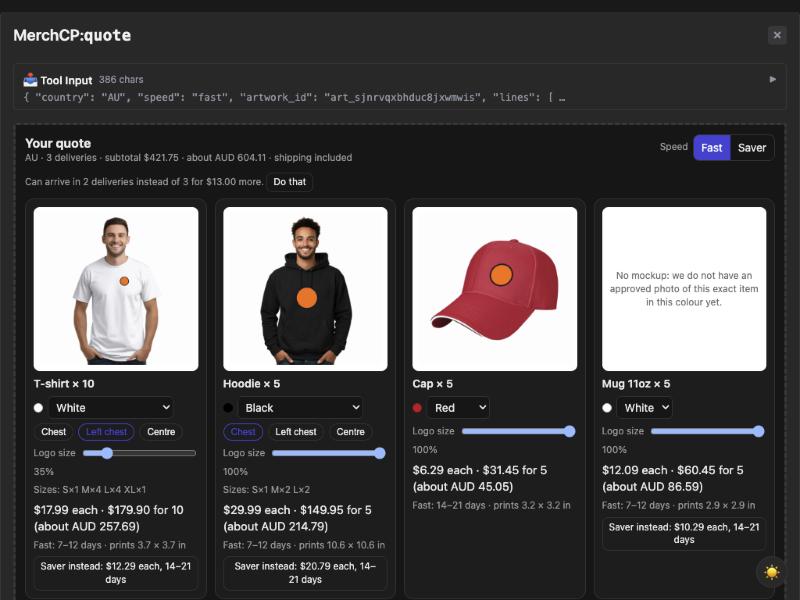
Prices come live from the printers, so what you see is what it costs today. Buying a few more of something is cheaper per item, and the quote shows you exactly how much.
MerchCP is an MCP server. Any assistant that supports connectors can use it. There is no account to create and nothing to install: add this address and start a chat.
Then try: "I need 20 navy tees and 10 mugs with this logo for a team in Sydney."
No. One item is fine. Small quantities carry more of the shipping, so the quote also shows what five or ten would cost each.
By printers in the US, the UK, Europe, Australia and New Zealand. Each item ships from the nearest one that can make it, and the quote says when it will arrive.
Whatever the quote says. Prices are live and include shipping. Outside the US you see an estimate in your own currency, and checkout charges in that currency.
We accept any file from 300 pixels wide and tell you how sharp each print will be. Dark logos go on light items by default and light logos on dark ones, and the quote warns you before anything disappears.
Yes. Chest, left chest or centre on garments, any size, or turned lengthways on a bottle. The mockup and the print file follow.
Misprints and damage are covered for 30 days with photos. Sizes and colours you chose are yours, so the assistant confirms them before checkout.
